

The single best fix for cross-location scheduling chaos is one source-of-truth system with location-aware staff availability, replacing spreadsheets and site-by-site calendars. Managers running this setup typically report fewer double-bookings, faster rebalancing when one site is overstaffed and another is short, and several hours a week clawed back from manual admin.
TL;DR:
- Implementing a centralized, location-aware scheduling system reduces double-bookings caused by staff working at multiple sites and improves real-time visibility.
- Proper configuration of "bookable at" flags and role-based permissions is crucial to prevent scheduling conflicts and ensure staff are assigned correctly.
- A phased rollout with pilot testing, staff training, and clear governance rules helps avoid operational disruptions and configuration mistakes.
- Monitoring key metrics such as booking utilization, open-shift fill times, and admin hours reveals the system's effectiveness and highlights staffing imbalances.
- Using features like conflict warnings, overlays, and role-specific dashboards enhances coordination and reduces manual coordination efforts across multiple locations.
Table of Contents
- What is cross-location scheduling?
- What causes double-booking and coverage gaps across sites?
- What are the measurable benefits of coordinating schedules across locations?
- Which features actually prevent scheduling conflicts?
- How should you govern scheduling rules across sites?
- How do you roll out cross-location scheduling without disrupting operations?
- Which metrics tell you the schedule is actually working?
- How do you keep every site's team aligned day to day?
- How do other appointment-based businesses handle multi-site scheduling?
- How DojangHub tackles multi-centre scheduling for martial arts academies
- What do managers usually get wrong when they roll this out?
- Try DojangHub for multi-location martial arts scheduling
- Sources
What is cross-location scheduling?
Cross-location scheduling means coordinating staff, rosters, and bookings across two or more physical sites from one central system, rather than running each location off its own spreadsheet or calendar. Multi-location scheduling and multi-site operations describe the same problem from slightly different angles, but they all point to the same fix: one source of truth, with permissions that reflect who should see and change what.
Three things separate a working setup from a fragile one.
- One source of truth. Every booking, shift, and cancellation writes to the same database, so nobody is checking three tabs to find out who's actually on the floor at Site B.
- Role-based permissions. A site manager edits their own location; a regional manager sees across the network; front desk staff see only what they need to book a client in.
- "Bookable at" staff flags. A staff member tied to Location A shouldn't appear as an option when someone tries to book them at Location C. Getting this flag wrong is the single most common cause of the double-booking headaches covered next.
Governance is the part most guides skip. You've got three real options: fully centralised (head office sets every shift), fully decentralised (each site manager runs their own show), or hybrid, where head office fixes the rules that must stay consistent (pricing, service catalogue, opening hours) and local managers control the day-to-day roster within those rules. For most multi-site operators, hybrid governance is the practical answer. It stops branch drift on pricing while letting the person who actually knows Tuesday's foot traffic make the call on staffing it.
What causes double-booking and coverage gaps across sites?
Most cross-site scheduling failures trace back to a handful of repeat offenders. Recognising the pattern is the first step to fixing it.
- Double-bookings from shared staff. An instructor or technician works at two locations, gets booked at both for the same slot, because neither calendar knew about the other. This is the most common failure mode, and it's almost always a "bookable at" configuration problem rather than a training issue.
- Uneven demand between sites. One branch is slammed while another sits quiet, often because local events, seasonal patterns, or a nearby competitor closing shift demand faster than the roster adjusts.
- Service and pricing conflicts. Location A offers a service or rate that Location B doesn't, and a customer books it at the wrong site, or a promotion applies inconsistently because nobody centralised the catalogue.
- Timezone and calendar pitfalls. Multi-region operators lose hours to slot-time confusion when a shared calendar doesn't clearly display local time, and a 9am booking at head office lands as 6am for a client three timezones away.
- Overlapping shifts nobody flagged. Two managers schedule the same resource, room, or piece of equipment for overlapping windows because there was no shared, real-time view of what's already committed.
Every one of these is a visibility problem before it's a technology problem. The fix isn't more spreadsheets. It's a shared, real-time picture that every location manager can see.
What are the measurable benefits of coordinating schedules across locations?
Centralised, real-time scheduling produces gains that show up on a spreadsheet within weeks, not quarters.
Pro Tip: Track admin hours before you switch systems. You need a "before" number to prove the "after" one actually moved.
- Time saved on coordination. Vendor-reported figures put reclaimed manager time at several hours a week once real-time sync replaces manual cross-checking between sites.
- Fewer emergency staffing scrambles. Real-time visibility and automated conflict detection cut the frequency of last-minute overtime and uncovered shifts, because gaps surface hours or days earlier rather than the morning of.
- Better utilisation. Seeing bookings and staff load across every site at once makes it obvious where you're overstaffed and where you're thin, so cover decisions stop being guesswork.
- Fewer no-shows, better customer experience. Consistent service and pricing information across sites means customers book the right thing at the right place the first time.
- Standardised reporting as you grow. Adding a fourth or fifth site is a configuration exercise, not a rebuild, when every location already reports through the same system.
Real-time sync itself is the mechanism behind most of this. Updates typically propagate across sites within one to five minutes, which is fast enough that a change made at Site A shows up before Site B's front desk has finished the next phone call.
Which features actually prevent scheduling conflicts?
Feature lists are easy to pad. This is the shorter version: the capabilities that solve the problems in section two, and nothing else.
- Real-time sync. Non-negotiable. If a booking made at one site takes more than a few minutes to appear everywhere, you're back to phone calls and guesswork.
- Location-based availability and "bookable at" flags. The system should only ever offer a staff member for a slot at a site they're actually assigned to, a key coordination challenge covered extensively in the Fitness Flow blog. This single control prevents most double-bookings before they happen, rather than flagging them after the fact.
- Service and resource controls per site. Pricing, service menus, and room or equipment availability need to be settable at the location level, even when they inherit defaults from a central catalogue.
- Conflict warnings, not just conflict blocks. A system that flags an overlap and lets a manager override it with a reason on record beats one that hard-blocks every edge case, because some overlaps are intentional.
- Integrations with calendars and payments. Syncing with tools like Google Calendar keeps personal commitments out of the booking grid, and payment integration removes a second manual step that otherwise causes its own scheduling drift.
- Role-specific dashboards. A regional manager needs a network-wide view; a single-site coordinator needs their own site and nothing else cluttering the screen.
- Cross-site overlays and filters. The ability to view another site's roster in read-only mode, filtered by role or date, lets you plan cover without accidentally editing someone else's schedule.
Pro Tip: Set up "bookable at" flags before you go live, not after the first double-booking complaint. It's the one setting almost every failed rollout skipped.
How should you govern scheduling rules across sites?
Getting the daily mechanics right matters more than picking the perfect platform. Here's the operating rhythm that keeps a multi-site roster from drifting into chaos.
- Publish on a fixed cadence. Roster changes made at the last minute are where conflicts breed. Publish two to three weeks ahead and treat late changes as exceptions requiring sign-off.
- Use templates and copy-week workflows. Most weeks look like the last one. Copying a template and adjusting the exceptions is far less error-prone than building each roster from scratch.
- Run hybrid governance deliberately. Head office locks pricing, service definitions, and opening hours; site managers control who works when, within those bounds. This split is the approach most multi-site operators land on once they've tried the extremes.
- Assign staff to sites before you roster them. Every staff member needs a clear "home" location plus any secondary sites they're eligible for, tagged by skill or role, before anyone builds a shift around them.
- Build an open-shift protocol. When a site is short, an open-shift workflow that notifies eligible staff across nearby locations fills gaps faster than a manager working the phones.
Pro Tip: Skill and role tags matter as much as availability. A qualified instructor with the wrong tag will get scheduled somewhere they can't actually deliver the class.
The mistake most managers make here isn't choosing the wrong governance model. It's failing to write the model down. If nobody can say in one sentence what head office controls versus what the site manager controls, you'll relitigate the same argument every time a conflict comes up.
How do you roll out cross-location scheduling without disrupting operations?
A phased rollout beats a big-bang launch every time, because it lets you catch configuration mistakes on a small scale before they become network-wide.
- Audit what you've got. List every location's services, staff, and current tools, including who's currently "bookable" where, before you touch a new system.
- Define the central catalogue and local permissions. Decide what's fixed network-wide (pricing, core services) and what each site manager controls (day-to-day roster, local promotions).
- Pilot in a small cluster. Two or three sites, not the whole network. Pilot first, then scale is the lowest-risk sequence, and it's the step most rushed rollouts skip.
- Measure the pilot against real KPIs. Admin hours saved, double-booking incidents, and staff feedback, not just "did it feel smoother."
- Train before you expand. A short session on notification rules and conflict escalation prevents the "nobody told me" excuse that kills adoption.
- Roll out in waves. Add sites in batches, applying what the pilot taught you each time.
Before scaling past the pilot, confirm you've covered:
- Staff-to-location mappings are complete and accurate
- Notification rules are set for open shifts and conflicts
- An escalation path exists for unresolved overlaps
- Every site manager knows what they can and can't change centrally
Which metrics tell you the schedule is actually working?
Numbers beat instinct here. Track these by site, not just network-wide, or you'll miss the one location quietly dragging the average down.
| Metric | What it tells you | Watch for |
|---|---|---|
| Bookings per available hour | Utilisation by location | Persistent gaps between sites signal a staffing imbalance |
| Open-shift fill time | How fast gaps get covered | Slow fill times point to weak notification reach or too few cross-trained staff |
| No-show and cancellation rate | Customer-side friction by site | A spike often follows a service or pricing mismatch, not a customer behaviour problem |
| Admin hours on scheduling | Whether the system is actually saving time | If this hasn't dropped weeks after rollout, check for manual double-checking habits that never got retired |
| Labour cost variance | Whether staffing matches demand | Consistent overspend at one site usually traces back to demand forecasting, not the roster tool |
Review these monthly at minimum, and weekly during the first quarter after rollout. The pattern that matters most is the gap between sites, not the network average, because averages hide the one location that's quietly bleeding hours or overstaffing every Tuesday.
How do you keep every site's team aligned day to day?
The best system in the world fails if people don't trust what it tells them. A few habits fix that:
- Set notification rules that actually reach people. Push alerts for open shifts and conflicts, not just an email nobody opens until Monday.
- Use read-only overlays when planning cover. A manager should be able to glance at another site's roster without risking an accidental edit.
- Write SLAs for handovers between location managers. Who confirms a cross-site booking, and by when, needs an answer that doesn't depend on who happens to be free that day.
- Document the rules and review them quarterly. Governance drifts as sites are added; a documented process is easier to defend than "that's just how we've always done it."
Pro Tip: Give every location manager read access to every other site's calendar. Most cross-site conflicts get caught by a manager who noticed something looked off, not by an automated warning.
How do other appointment-based businesses handle multi-site scheduling?
Retail chains centralise pricing and stock visibility while leaving shift-filling to local managers. Salons and clinics juggle station or room assignment on top of staff availability, since a stylist or clinician is only as useful as the chair or treatment room that's free. Hospitality groups lean hard on demand forecasting, because footfall swings site to site with local events far more than headcount does.
Martial arts academies face their own version of the same puzzle:
- Instructors rotate across two or three locations, and a "bookable at" mistake means a black belt gets double-booked teaching the same evening slot at two dojangs.
- Class capacity has to respect the physical space at each site, not a single network-wide cap.
- Multi-centre class passes mean a student's booking at one location has to reflect real-time capacity at another, or you get overbooked mat time.
- Grading events and competitions need cross-site coordination for instructor availability well beyond the usual weekly roster.
How DojangHub tackles multi-centre scheduling for martial arts academies
DojangHub was built around the exact checklist above, not as a generic booking tool retrofitted for dojangs. Multi-centre scheduling sits alongside role-specific dashboards for owners, instructors, and students, so a head instructor sees their own class load while an owner sees every location at once.
The operational effect is what academies actually feel: spreadsheets disappear, and with them the manual cross-checking that used to eat a manager's Monday morning. Users have reported saving significant time that previously went into juggling instructor rotations, attendance logs, and payment tracking across sites by hand.
A sensible pilot looks like this:
- Map every instructor to their home and secondary locations before switching on multi-centre scheduling
- Run one or two centres through a full grading cycle and event schedule before rolling out network-wide
- Track admin hours and double-booking incidents during the pilot, the same KPIs covered earlier in this guide
- Compare payment tracking accuracy against your previous spreadsheet-based process
Every capability referenced here, multi-centre scheduling, dashboards, payment tracking, reflects publicly listed platform features rather than a hypothetical build.
What do managers usually get wrong when they roll this out?
The trade-off nobody tells you about upfront is that central control and local flexibility pull against each other constantly. Lock everything down centrally and your best site manager, the one who actually knows Tuesday's rush pattern, stops bothering to flag problems because nothing they say changes. Hand over full control to every location and you lose the pricing and service consistency that made the network worth running as a network in the first place.
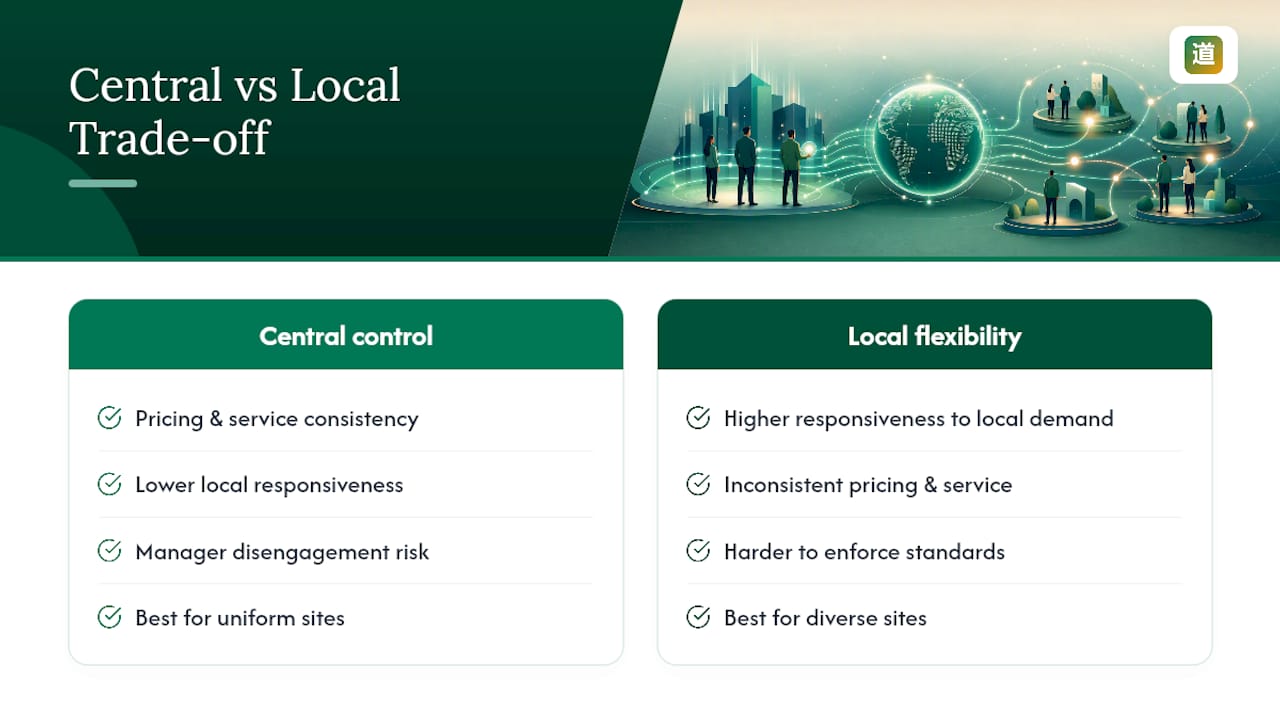
The two mistakes that show up again and again are skipping the pilot and skipping training. Teams that go straight from spreadsheets to a network-wide rollout spend the next two months firefighting configuration issues that a two-site pilot would have caught in a week. Teams that roll out the tool without training staff on notification rules end up right back on the phone, which defeats the entire point of switching.
If there's one thing worth doing before anything else: pilot on a small cluster, and measure admin hours and utilisation before you decide the rollout worked.
— Package
Try DojangHub for multi-location martial arts scheduling
Running two or three dojang locations off spreadsheets means someone is manually checking instructor availability every time a class gets booked, and mistakes only surface after a student turns up to an empty room. DojangHub replaces that manual cross-checking with multi-centre scheduling built specifically for academies, where instructor assignments, class capacity, and event scheduling live in one system instead of three inboxes.
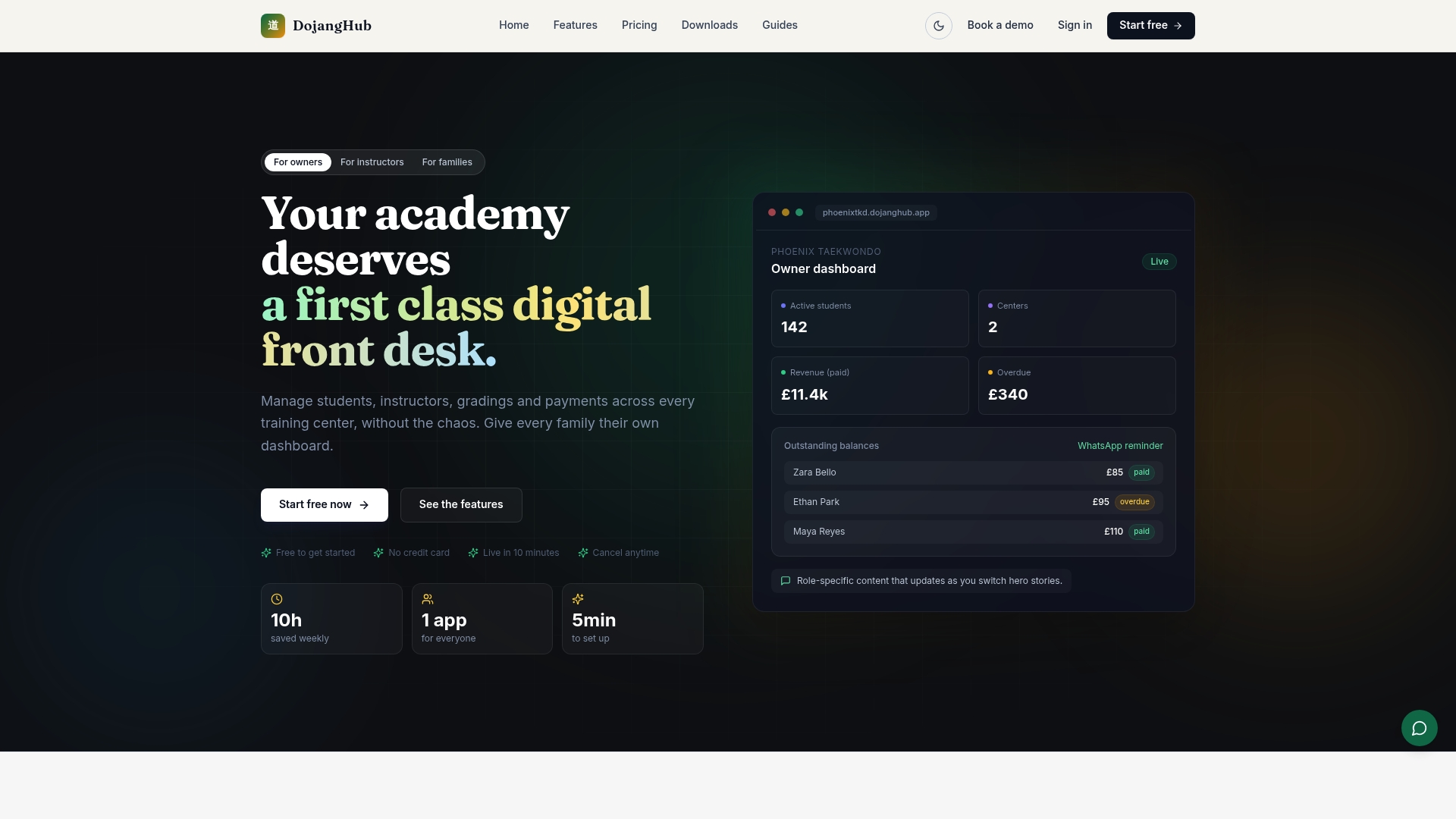
The platform pairs scheduling with automated payment tracking and role-specific dashboards, allowing owners to see multiple centers at a glance while instructors see just their own roster. Switching over from spreadsheets, users have reported reclaiming significant time that used to go into manual coordination. If your dojangs are still running on separate calendars, visit the DojangHub product page to see the multi-centre features in action and start a trial for your academy.
Sources
- Multi Location Scheduling: Keep Every Site Synced In Real Time – Schedly
- Multi-Location Scheduling, Guide (2026) | SchedulingKit
- Multi-Location Scheduling Software: Simplify and Streamline | Square
- 7 Common Challenges of Shift Scheduling + Powerful Fixes | Deputy
- Cross-location scheduling | Lupa Help Center